
Patrik
Wise words of the week
A language that doesn’t affect the way you think about programming is not worth knowing. — Alan Perlis
My being a teacher had a decisive influence on making language and systems as simple as possible so that in my teaching, I could concentrate on the essential issues of programming rather than on details of language and notation. — Niklaus Wirth (designer of Pascal, Modula-2, and Oberon)
Journal
Building features is often not very linear. I start with an idea and try to implement it into software. As important as the idea is, the real craft is in building it properly. Making it pleasant to use and reducing friction so that it becomes usable. This last part is very often interactive and requires quite some tuning.
Using the right software stack can make a huge difference here.
3 years ago, I was using Python because it was much faster to experiment with it. Gone were the days where compiling Java or C++ would take 15 minutes, a true killer for experimentation. But Python came with the drawback that errors always happened at runtime, even those that could be prevented by the use of a compiler. And performance for some heavy computational solutions was not great.
Then I started using Go and I was taken away. The compilation was often faster than it would take for Python to start. And the compiler would catch most of my stupid mistakes and typos. The simplicity of the language paired with a solid structure makes it really fast to compile. I like how the developers of Go managed to get some of these critical ideas from Oberon, one of the precursor languages of Go. Not surprising since they came from exactly that project.
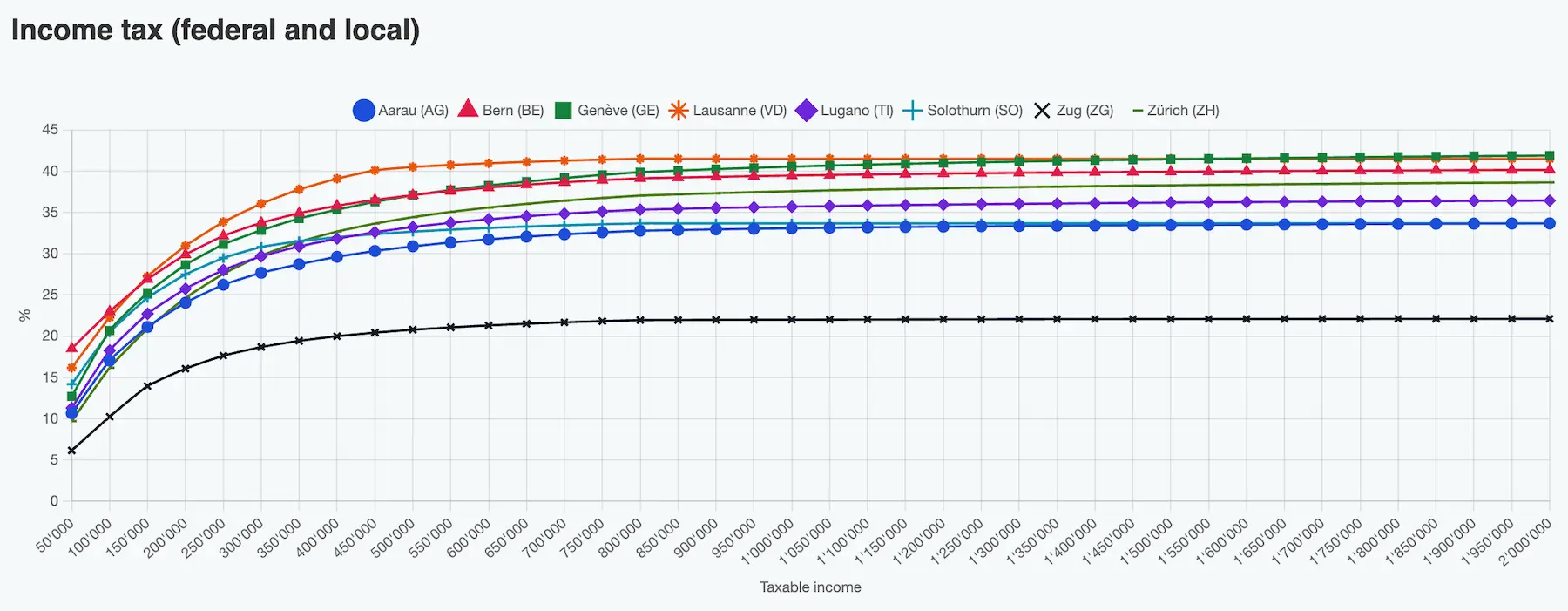
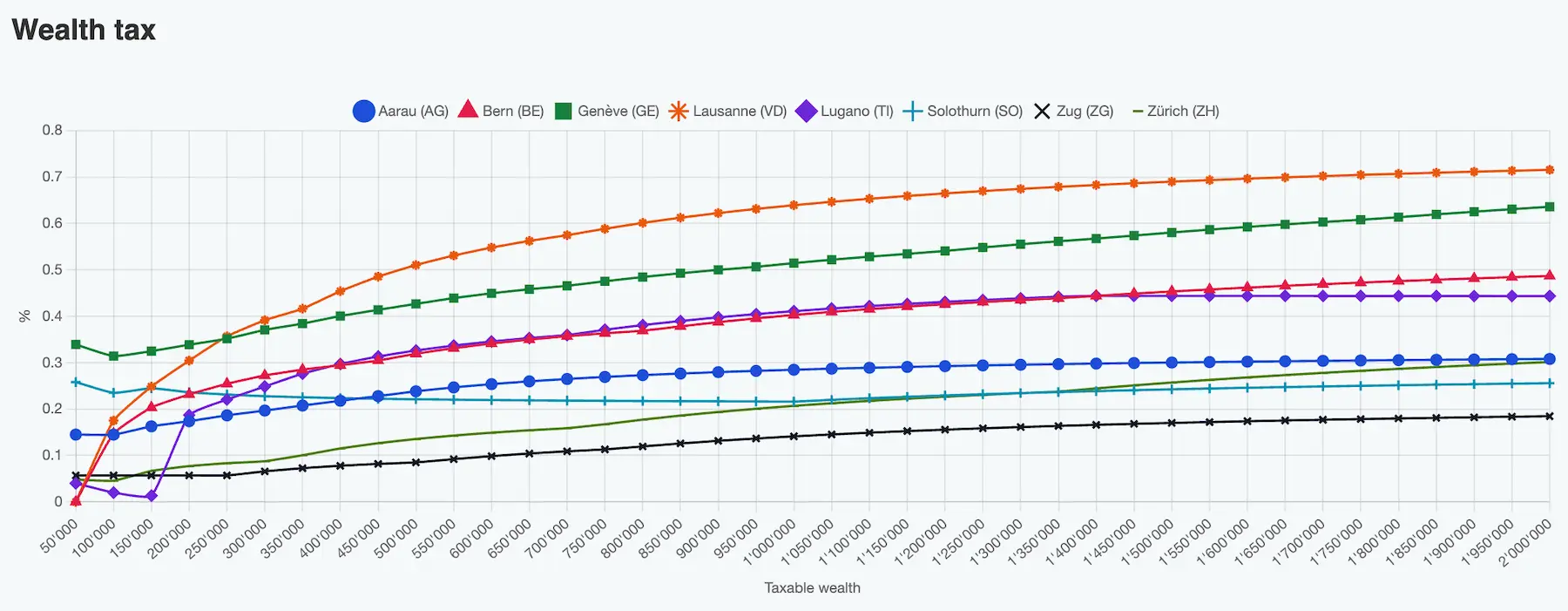
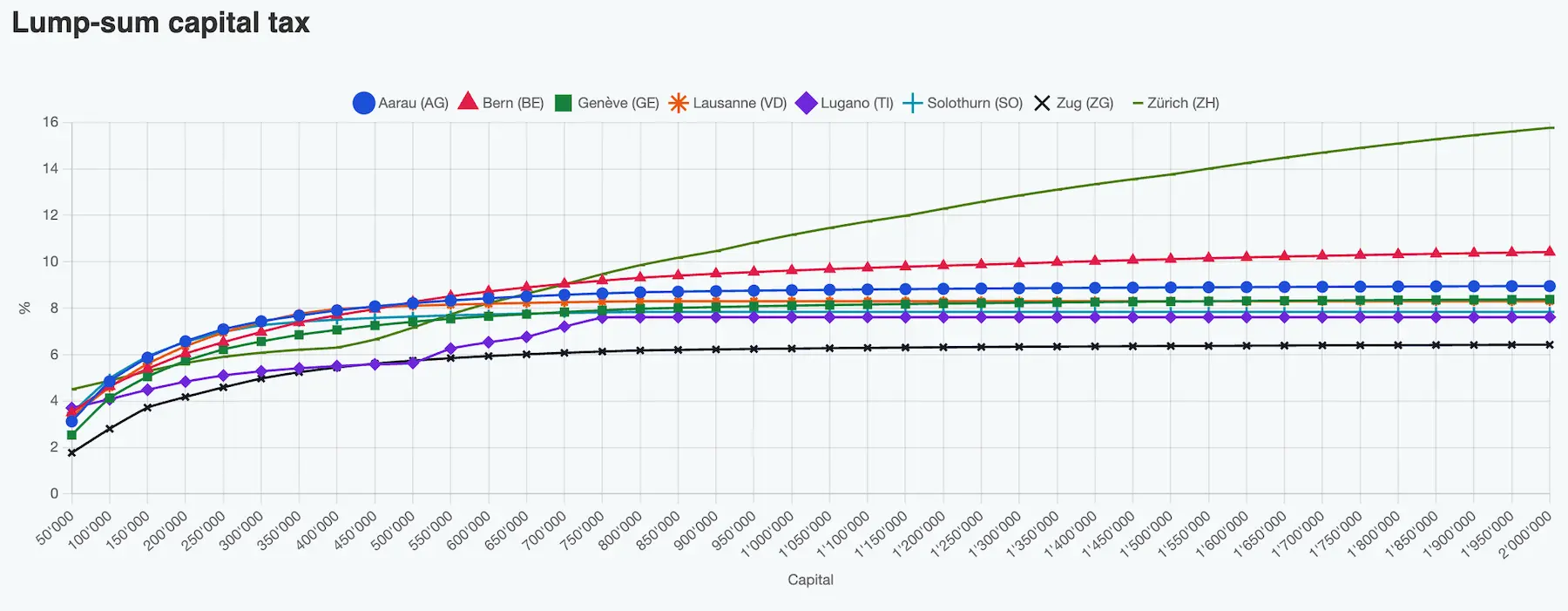
This week I wanted to build upon the FI Planner engine that computes taxes. I was curious to see some comparison of tax rates that I had rarely seen around. I admit, I didn’t spend much time searching either. Yes, there are some tables like the ones provided by finpension, but I wanted a chart.
With the good base provided by FI Planner’s own tax library, Go, and Cursor, it took me less than 30 minutes to generate some pages with charts to compare the tax rates across locations. This included doing 4-5 iterations to polish the UI and a few serendipitous “oh, now that I have this I could also build that”. This was all made possible by those very short development cycles that took less than five minutes from prompting Cursor to having the prototype running. This is something that would have taken me at least a couple of days in the past.
We live in interesting times.
How did I use AI this week?
I’m really impressed by how much Cursor is helping me for just USD 20/month, and I’m not even maxing it out. Here are 3 examples.
I maintain the website for my wife’s business. Every now and then, she sends me an email with a few changes she wants done. This is a mixed blessing, because I did it before learning about Hugo and used Jekyll on GitHub Pages instead, whose configuration is very brittle. Every time I do something, it fails to build in new and creative ways. So I copy-pasted her message verbatim into Cursor and it just made the changes exactly as she wanted. Nice.
Another example was to support Italian in FI Planner. These are mostly frontend changes but the backend needs to support the user preferences too. I used this prompt and it just worked out of the box. I still had to tweak some translations due to ‘personal preferences’, but that was all it took.
Support italian.

There are 3 major changes:
1. in the frontend, provide italian translations in @Localization.ts and @Localization2.ts . In the latter, skip the tax deduction translations (the ones whose key ends in _EK or _VM because I will provide them myself from the official tax tables). And support italian selection in the user preferences.

2. in the backend, add italian to the @userpreferences.go

3. kit integration: add the tag for italian and add italian to the language propagation on language switch.
The third one was to implement a tax calculator. The initial prompt did almost all the work, I just needed some simple tuning but nothing major. Granted, the FI Planner application provides many of the functionalities, but Cursor (in this case using Grok) was able to find where and how to integrate with the existing code. I first created a plan (7m 15s), then built it (13m 32s).
I want to create a tax calculator.

It is accessible on the main page by adding a link under settings (similar to the admin page).

The calculator asks for a person's profile, which consists of one person with birthdate and religion and optionally (if married) a second person with birthdate and religion. It would be nice to reuse the widgets from the personal situation to provide a similar user experience.

Other imput fields:
- location: support for one location, list of locations, or all locations; use the location widget for the selection of a location; make sure to limit the locations to only the supported cantons.
- year (default to current year)
- optional: lumpsum capital tax: ask for the amount of pension money cashed in
- optional: federal tax: ask for the taxable income
- optional: cantonal/local tax: ask for the taxable income and wealth
- optional: year factor (default 1): how many years to compute, i.e. in the tax total multiply the federal and local tax (but not the lumpsump tax) to simulate running this for the given amount of years.

When submitted, the result page contains a table with multiple columns:
- location as municipality and canton
- lumpsum tax (if selected)
- federal tax (if selected)
- cantonal/local tax (if selected)
- total tax

Make the table sortable by any of the columns, by default sort by the total tax, ascending.

Implement a json message for the request and the response. In the backend, use the code in the taxes module (@taxes.go ) to compute the values, using LumpSumTax, LocalTax, and  FederalTax. For now, use the taxable values, don't apply deductions.
Marc
The build
The past days were intense on tokens burnt haha (more on that below).
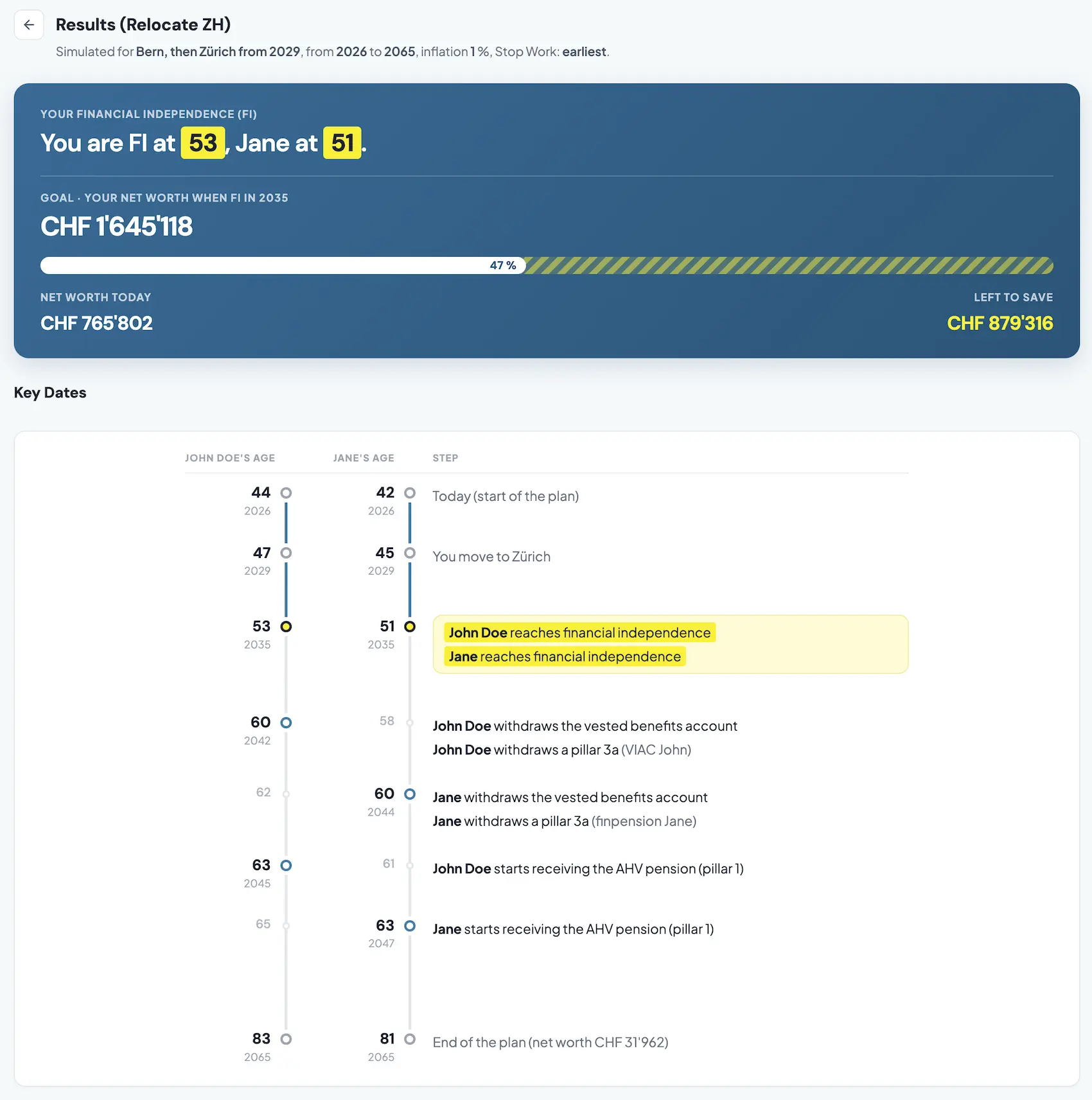
As usual, good design is to me about “less is more”, so after a good 21 iterations, I finally revamped the two blocks at the top of our results page.
My goal was twofold: make it clear, and make it a story. Instead of the boring tables we had before, filled with numbers all the same size and importance.
An image speaks a thousand words, so here is what to expect very soon with our next release.
The edge
Patrik delivers faster than I can strategize about the product haha (see his notes above about the upcoming calculators). Joke aside, we have to think about how we integrate those into FI Planner. Are they independent or part of the product? Are they free or part of the paid plan? Plenty of questions to work through, while Patrik is only limited by his imagination (and tokens, thankfully ahah)!
Note to a friend
If you have to design a new feature, don’t code it directly. Make it pixel perfect in Claude Code, so you iterate fast there first not caring about code. Get feedback from your cofounder on that version too (stupid me, I didn’t). Only then, ask Claude for a plan to implement it, and hand it over to Cursor.
Tool of the week
MCP all the way! I reserved MCP for tools I felt were capable of handling my requests, mostly reading and not writing. With the exception of Gmail, where I know it’s only authorized to create drafts, not send on my behalf. Which means I hesitated for a long time to use the Kit MCP, for fear it could mess up my tags and sequences, and would handle the email layout badly. Stupid me for having waited so long! I now use it for all the tagging of our FI Planner waitlist rollout and for preparing emails. And it just works.
So if you use a digital tool that has an MCP, I can’t urge you enough to try it out. Otherwise you may regret in a few months not having tested it earlier, like I did!